
We’re excited to announce the launch of our completely redesigned Email Settings page, giving you a new level of control over the branding and sender identity of every email sent from your job board.
Emails are one of the most critical touch points with your users. This update allows you to ensure every notification—from a password reset to a weekly job alert—is perfectly aligned with your company’s brand, increasing professionalism and user trust.
You can now find these new settings under:
Site Config > Customizations > Email Settings
1. Unified Sender Identity (Basic Information)
The first step to building trust is ensuring your emails look professional and come from a recognizable source. You can now define all key sender details in one central place:
- From Email: Set the exact email address used to send messages (e.g., [email protected]).
- From Name: Define the sender name that appears in the recipient’s inbox (e.g., “The Optimizer Jobs”).
- Company Name: Used for branding and official communication.
- Business Address: Provided at the bottom of the email, this is essential for email compliance and professionalism.
2. Deep Visual Customization
Beyond the sender details, you can now fully customize the aesthetic of your emails to match your job board’s unique look and feel.
The new Visual Customization section includes:
- Logo: Upload your company logo to appear prominently in all emails.
- Font Family: Select the default font to maintain consistency across communications.
- Primary Color: Controls the color of your call-to-action buttons (e.g., “Apply Now” or “Edit Settings”).
- Secondary Color: Controls the color of secondary elements and hyperlinks (links).
- Background Color: Set a custom background color for your email template.
3. Dual Configuration for Maximum Flexibility
We understand that different types of emails serve different purposes. That’s why we’ve split the settings into two distinct groups:
| Setting Group | Configuration | What it Controls |
| Default Settings | Base Configuration | Transactional Emails (Standard operations like password changes, job application receipts, account confirmation, sales receipts, etc.) |
| Job Seeker Engagement Settings | Specialized | Engagement Emails (Emails specifically designed to drive re-engagement, such as job alerts and suggested job emails.) |
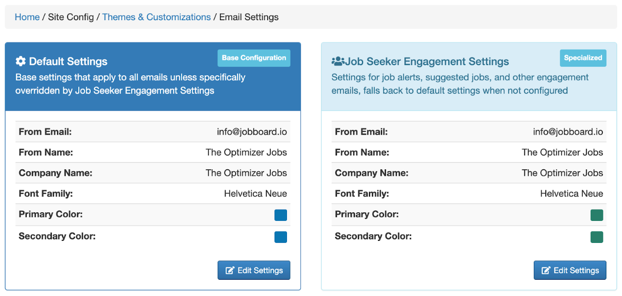
The specialized Job Seeker Engagement Settings (right panel in the image) allow you to override the default name, colors, and font family specifically for job alerts and suggested jobs. This is perfect if you want to use slightly different branding or messaging for high-volume marketing communications versus essential transactional emails.
Important Note on Migrated Settings
To unify your email configuration, we have moved the previously separate settings for Job Alerts.
If you had custom branding set up for your Job Alerts, those settings have been automatically migrated into the new Job Seeker Engagement Settings panel.
Please review your new Email Settings dashboard to ensure your branding is exactly how you want it across all your automated communications.
We encourage all customers to visit Site Config > Customizations > Email Settings today to take advantage of these powerful new branding controls!